Book Appointment Now

What is a PCB? A plain-language guide to how printed circuit boards are built, the six board types buyers quote, and how to pick the right one.
What Is a PCB Circuit Board? Types, How It’s Made, Where It’s Used

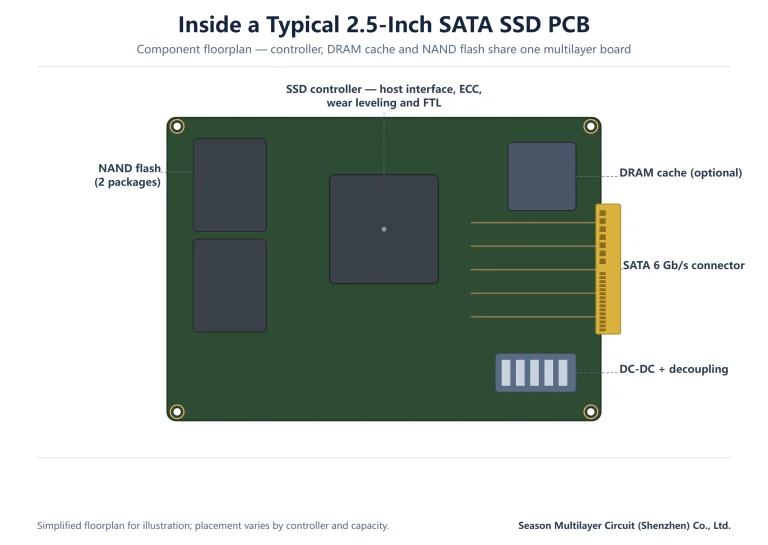
What is a PCB, exactly? A printed circuit board is the flat, layered board inside nearly every electronic product that holds the chips in place and connects them with etched copper traces. It replaces a tangle of wires with a repeatable, testable structure: copper layers carry signals and power, insulating layers keep them apart, and holes plated with copper stitch the layers together. When someone says a product “has good hardware,” they are usually praising a PCB that was specified and built well. This guide answers the question from a buyer’s point of view rather than a textbook’s: what a PCB is made of, the six board classes you will actually be quoted, how the manufacturing process turns a Gerber file into a finished panel, and how to choose the right class for your product. Every term used here appears on quotations and engineering reviews, so the vocabulary is directly usable in sourcing conversations.
Table of Contents
- What Is a PCB? The Short Answer
- What Is a PCB Made Of? Layers in the Stack
- PCB Types: Six Classes You Will Actually Be Quoted
- Multilayer and HDI Boards: When Density Drives the Stackup
- High-Speed and High-Frequency Boards
- How a PCB Is Manufactured: From Gerber to Shipment
- Where PCBs Are Used: Matching the Board to the Product
- Choosing a PCB Type: A Practical Decision Table
- FAQ
- Send Your Gerbers and Get a Stackup Review
What Is a PCB? The Short Answer
A PCB — printed circuit board — is a rigid or flexible board whose surface carries copper conductors etched into a pattern that connects electronic components. Components are soldered to pads, signals travel along the copper traces, and power reaches every chip through dedicated planes. The word “printed” comes from the process: the pattern is transferred photographically onto the board, the way ink is printed, rather than wired by hand.
Three numbers describe most boards at first contact: the layer count (how many copper layers are laminated together), the minimum trace and spacing (how fine the routing can be), and the finished thickness. A simple appliance board may be a single copper layer on fiberglass; a computing board may stack thirty layers with controlled impedance on every signal. Between those extremes sit the board classes described below.
Understanding what a PCB is also means understanding what it is not: it is not the components, and it is not the assembly. A bare board arrives with copper and mask only; assembly (SMT or through-hole) is a separate quotation and process. Buyers who keep the two scopes separate get cleaner quotes and fewer surprises at engineering review.
What Is a PCB Made Of? Layers in the Stack
The foundation is the substrate: FR-4, a fiberglass-reinforced epoxy laminate that gives the board its rigidity and most of its electrical insulation. Copper foil is bonded to the substrate and etched into conductors. A prepreg layer — fiberglass impregnated with resin that melts and re-cures under heat and pressure — glues the individual cores together during lamination.
On top of the outer copper sit two protective layers. Solder mask, the familiar green (or black, blue, or any customer-specified colour in LPI finish), insulates the traces so solder only wets the pads. Silkscreen prints component labels and part marks on top. Surface finish — ENIG, HASL or OSP — coats the exposed pads so they stay solderable and, in ENIG’s case, corrosion-resistant with a flat gold surface.

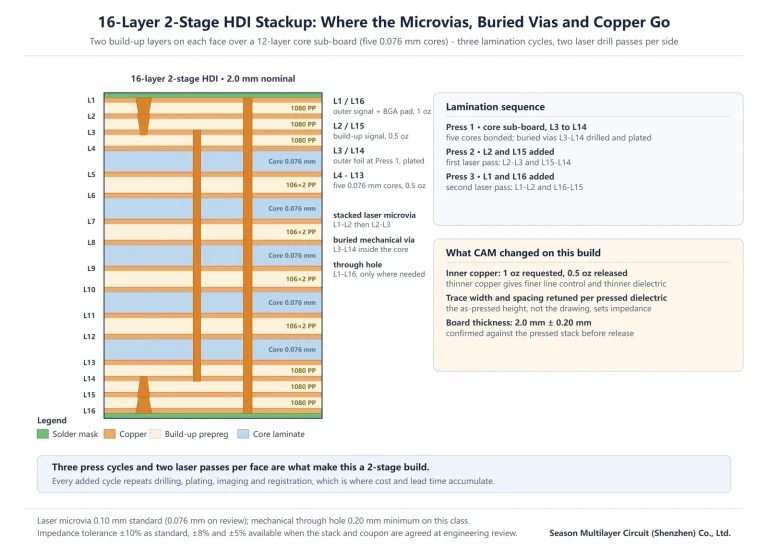
Finally, holes. Plated through holes carry signals between layers and through-hole component leads; the copper lining their walls is what makes them conductive. On HDI boards, laser-drilled microvias — 0.1 mm nominal at our facility, 0.076 mm on engineering review — make the same connections with far less space. Every layer in the stack exists for one of three jobs: carry signal, distribute power, or keep the two apart.
PCB Types: Six Classes You Will Actually Be Quoted
Quotations group boards into classes because factories price and schedule each differently. The six below cover the overwhelming majority of requests; anything more exotic is usually one of these with an added process, not a separate species.
| Type | Copper layers | Typical applications | Defining trait |
|---|---|---|---|
| Single-sided | 1 | LED lighting, toys, appliances | One copper layer, lowest cost |
| Double-sided | 2 | Power supplies, motor drivers | Both sides routed, PTH connects them |
| Multilayer | 4–30 | Industrial control, computing | Inner layers, controlled impedance |
| HDI | 6–14 typical | Smartphones, dense BGAs | Laser microvias, build-up lamination |
| Flex | 1–6 | Wearables, camera modules | Polyimide base, bends in the product |
| Rigid-flex | 4–12 typical | Medical devices, automotive modules | Rigid and flex zones laminated as one |

Two of these classes deserve their own vocabulary. Multilayer boards introduce inner-layer imaging and lamination cycles — our PCB manufacturing process guide walks the full sequence. Flex and rigid-flex replace some fiberglass with polyimide, which bends instead of breaking; our 6-layer rigid-flex PCB page shows a production example, and double-sided medical FPC shows the flex case.
Multilayer and HDI Boards: When Density Drives the Stackup
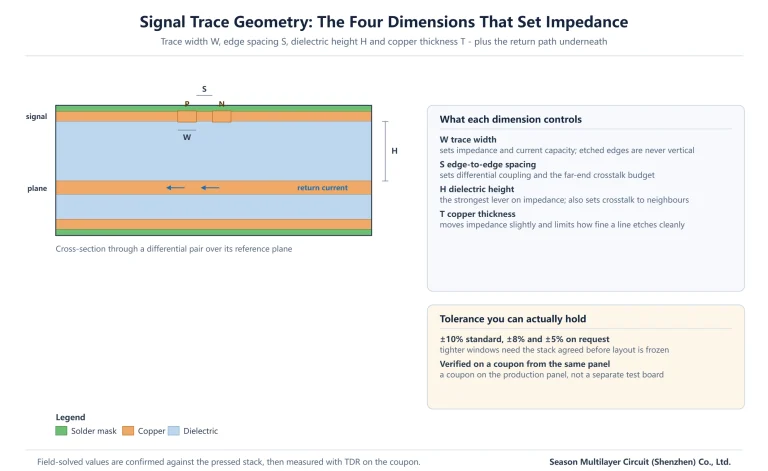
A multilayer board earns its extra layers by pairing every signal layer with a reference plane, which both controls impedance and gives return currents a short path home. That is why industrial and computing boards jump from two layers to four or six before routing gets denser — the planes are doing electrical work, not just adding thickness.
HDI (high-density interconnect) takes the same idea further with laser-drilled microvias that connect only adjacent layers, freeing routing space on every layer they touch. Because microvias are built in sequential lamination cycles, HDI boards are described by stage count — 1-Stage, 2-Stage, 3-Stage or any-layer — and each additional stage adds cost and lead time. The differences are laid out in our HDI stages explained guide and the deeper material in the HDI PCB technology pillar.
A practical rule for buyers: choose HDI when a component’s pin pitch cannot escape on conventional drills, not when the layout is merely tight. A 0.8 mm-pitch BGA often escapes on a 6-layer conventional build; a 0.4 mm-pitch application processor usually cannot. Matching the board class to the hardest component on the board — rather than to the whole board’s average — is the fastest route to a build that passes first spin.
High-Speed and High-Frequency Boards
Two adjectives describe boards whose copper is not the hardest part of the design. High-speed boards carry fast digital interfaces — DDR memory, PCIe, Ethernet — where the challenge is timing and loss on standard FR-4-class materials; stackup, length matching and via discipline do most of the work. High-frequency boards carry radio and microwave signals, where the laminate itself matters: lower dielectric constant and loss tangent keep the signal from heating the board instead of leaving the antenna.
The material families differ accordingly. High-speed designs may only need a mid-loss FR-4 upgrade; high-frequency designs move to PTFE-based or ceramic-loaded laminates with different press and drilling parameters. Our high-speed PCB guide covers the digital case and the high-frequency materials guide covers Dk/Df selection in depth. Both trace back to the IPC standards maintained by the Global Electronics Association, which define the test methods behind the numbers on a laminate datasheet.
For sourcing, the practical difference is in the questions the factory will ask: high-speed builds get questions about impedance coupons and reference planes; high-frequency builds get questions about material brand substitution, copper roughness and bond-ply compatibility. Answering those early keeps the quote accurate.
How a PCB Is Manufactured: From Gerber to Shipment
The manufacturing process is a fixed sequence, and each step feeds the next. The table below is the version buyers can use as a mental map; our full manufacturing process walkthrough adds the process windows and inspection points for each stage.
| Step | What happens | Critical control |
|---|---|---|
| 1. CAM review | Gerber data checked, panel arranged | Catch missing layers and DFM issues early |
| 2. Inner-layer imaging | Dry film laminated, exposed, developed | Line width and spacing fidelity |
| 3. Etch and AOI | Unwanted copper etched, layers scanned | Automatic optical inspection vs. reference |
| 4. Lamination | Cores and prepreg pressed into one panel | Registration, thickness, no voids |
| 5. Drilling | Mechanical and laser holes drilled | Hole position and wall quality |
| 6. Plating | Hole walls metallized with copper | Copper thickness in the barrel |
| 7. Outer imaging and plating | Pattern transferred, traces plated up | Etch compensation, plating uniformity |
| 8. Solder mask and legend | Mask applied and cured, labels printed | Mask registration on fine pads |
| 9. Surface finish | ENIG, HASL or OSP applied | Pad solderability and flatness |
| 10. Rout, e-test, final inspection | Boards routed out, electrically tested | Netlist test coverage, impedance coupons |
One number in that sequence surprises most first-time buyers: layer-to-layer registration. Inner layers are imaged separately and then pressed together, so artwork must compensate for material movement during lamination. Registration capability — measured in tens of micrometres at production scale — is one of the quiet differentiators between a board that assembles cleanly and one that fights the placement machine.
Where PCBs Are Used: Matching the Board to the Product
Nearly every electronic product contains at least one PCB, but the class of board follows the product’s hardest requirement rather than its market. A router is a consumer product, yet its RF front end pushes it toward controlled-impedance multilayer work. An industrial sensor is unglamorous, yet wide temperature range and long service life push it toward heavier copper and conservative stackups.
Production examples on our site show the mapping in practice: a 4-layer router PCB for networking, 8-layer security system boards for video infrastructure, 12-layer automotive high-speed backplanes for in-vehicle networks, and 6-layer HDI automotive HUD boards where display density meets cabin temperature requirements.

When a product line spans several of these classes, the sourcing question becomes which factory processes live under one roof — lamination, HDI build-up, flex capability and assembly. Fewer handoffs between specialised vendors usually means tighter registration data and shorter correction loops when engineering review finds an issue.
Choosing a PCB Type: A Practical Decision Table
Most sourcing decisions reduce to a short list of questions about the hardest thing the board must do. The table below turns the six classes into a first-pass decision aid; the engineering review that follows any quote request will refine it with real stackup and impedance data.
| If your product needs… | Start with | Because |
|---|---|---|
| The lowest possible board cost | Single- or double-sided | No lamination cycles, simplest process |
| Controlled impedance or a power plane | 4–6 layer multilayer | Planes give return paths and stable impedance |
| A 0.4–0.5 mm pitch BGA escape | HDI (1-Stage or 2-Stage) | Microvias reach the inner rows |
| The board to bend inside the product | Flex | Polyimide survives repeated flexing |
| One assembly replacing board + cable | Rigid-flex | Removes connector and mating failure points |
| RF or microwave front ends | High-frequency laminate | Low Dk/Df keeps signal loss in budget |
Two habits keep the choice honest. First, specify from the hardest requirement, not the average one — one 0.4 mm-pitch chip or one RF net sets the board class. Second, share the requirement openly at quotation: a factory told that the goal is cost reduction will propose a different stackup than one told the goal is headroom for a next-generation chip. The Gerber format that carries your design into fabrication is deliberately dumb — context lives in the conversation, so put it there.
Frequently Asked Questions
What is a PCB in simple terms?
A printed circuit board is the flat board inside electronic products that holds chips and connects them with etched copper paths. Copper layers carry signals and power, insulating layers separate them, and plated holes connect the layers — a repeatable replacement for hand wiring.
What is the difference between single-sided and double-sided PCBs?
A single-sided board has one copper layer, so all routing must fit on one side with jumpers where traces cross. A double-sided board routes on both sides and connects them with plated through holes. Doubled routing space usually lets a design drop jumper parts and shrink, at modest added cost.
How many layers can a PCB have?
Common commercial builds run from 1 to about 30 layers; our group manufactures from 2 to 30 layers. Beyond roughly twelve layers the stackup is usually driven by power distribution and impedance planning rather than routing density alone, and each added layer pair raises cost and lead time.
What is the difference between HDI and a standard multilayer PCB?
HDI adds laser-drilled microvias — typically 0.1 mm — that connect only adjacent layers, plus sequential build-up lamination. That frees surface routing space and enables escapes for fine-pitch BGAs that conventional mechanical drills cannot reach. Stage count (1, 2, 3 or any-layer) describes how many build-up cycles were used.
When should a design use rigid-flex instead of flex plus connectors?
Rigid-flex wins when reliability matters more than board cost: replacing board-to-board cables and connectors removes mating failures and assembly steps, which is why medical and automotive modules favour it. For static bends or simple one-time folds, a cable plus stiffener is often the economical choice.
How long does it take to manufacture a PCB prototype?
Simple double-sided boards move fastest; conventional 4–8 layer multilayer prototypes typically complete in one to two weeks after engineering review, and HDI builds add sequential lamination cycles that extend the schedule. Exact lead times are confirmed at engineering review once stackup and special processes are known.
What files does a PCB manufacturer need for a quote?
Gerber and drill files with a stackup description — layer order, thickness, copper weights — plus impedance targets, surface finish, and any special processes such as gold fingers, depth control or flex zones. Complete data lets the factory quote once, accurately, instead of iterating.
Send Your Gerbers and Get a Stackup Review
Season Multilayer Circuit (Shenzhen) Co., Ltd. manufactures rigid multilayer, HDI, flex and rigid-flex boards from 2 to 30 layers — part of a group with three factories and 3,000,000 m² of annual capacity. Submit your Gerber files and requirement list for an engineering review, and our team will confirm the right board class, stackup and lead time before you commit to production.