Book Appointment Now

SSD PCB design explained: form factors, controller-NAND layout, layer counts and the signal-integrity rules that keep storage boards stable.
SSD PCB Design Explained: Layout, Layers and Signal Rules
An SSD PCB is the board that carries everything a solid-state drive actually is: the controller, the NAND flash packages, the optional DRAM cache and the power network that keeps them in sync. Because a drive fails as a system when any one of these blocks is compromised, the board itself decides whether the controller can run at its rated speed or throttles and drops commands under load. Its layer count, routing discipline and power design are the three levers, and a weakness in any of them shows up first as a performance problem. This guide walks through SSD PCB design from a sourcing and manufacturing point of view. It covers how the common form factors differ, where the controller, NAND and DRAM usually sit, and how many layers typical SATA and NVMe drives need. A closing section lists the signal- and power-integrity rules that matter most when you release Gerbers for fabrication. The goal is to give hardware engineers and buyers a shared vocabulary before a quote request goes out.
Table of Contents
- What Is an SSD PCB?
- SSD PCB Form Factors: 2.5-Inch, M.2, U.2 and E1.S
- Controller, NAND and DRAM: The Three Chips That Shape the Board
- How Many Layers Does an SSD PCB Need?
- Signal Integrity: SATA and PCIe Differential Routing
- Power Integrity and Thermal Paths on an SSD PCB
- Manufacturing Requirements for SSD PCB Builds
- An SSD PCB Design Review Checklist
- FAQ
- Get Your SSD PCB Stackup Reviewed Before You Release Gerbers
What Is an SSD PCB?
An SSD PCB is the multilayer carrier that connects an SSD controller to NAND flash, DRAM and the host interface connector. Unlike a generic logic board, a storage board lives or dies by a handful of high-speed differential pairs — the SATA or PCIe lanes — and by the cleanliness of its power rails. Everything else on the board exists to support those two jobs.
Mechanically, the board is also the enclosure interface: mounting holes, the edge connector or cable header, and often the thermal path to a heatsink all depend on board thickness, copper balance and stiffener placement. A drive that works electrically but warps 0.5% in a hot chassis is still a failed design, which is why stackup symmetry is taken seriously even on a four-layer board.
From a manufacturing standpoint, most SSD PCB builds are dense but conventional: fine lines, controlled-impedance differential pairs and ENIG finish on the gold fingers, without the exotic sequential-lamination work that HDI smartphones require. That combination makes storage boards a natural fit for mid-volume production with tight impedance control rather than prototype-only processes.
SSD PCB Form Factors: 2.5-Inch, M.2, U.2 and E1.S
Form factor drives almost every downstream decision in SSD PCB design — outline, connector style, layer count and even solder-mask colour. The 2.5-inch SATA drive inherited the mechanical envelope of the hard disk it replaced: a 69.85 × 100 mm board with a same-facing SATA connector. M.2 replaced the cable with a gold-finger edge connector and shrank the board to 22 mm wide, in 2242, 2260 and 2280 lengths.
Enterprise forms move the same silicon onto more demanding boards. U.2 (SFF-8639) keeps the 2.5-inch outline but switches to a PCIe edge connector with higher pin count and power budget. E1.S — one of the EDSFF shapes — optimises a narrow 31.5 mm-wide blade for 1U front-panel density. Each shape also fixes the connector stack-up. A 2.5-inch drive gets a SATA or SFF-8639 connector plus screw bosses. An M.2 blade, by contrast, relies entirely on the edge connector and a single mounting screw at the far end. That is why stiffener choice matters more as M.2 SSD PCB layers increase and the board gets thinner. Each step up in interface speed generally pushes the board thicker with more layers, because the differential pairs need reference planes to run against.
| Form factor | Board size (mm) | Host interface | Typical layer count |
|---|---|---|---|
| 2.5-inch SATA | 69.85 × 100 | SATA 6 Gb/s | 4–6 |
| M.2 2242 | 22 × 42 | SATA or PCIe (M key) | 4–6 |
| M.2 2280 | 22 × 80 | PCIe ×3 / ×4 NVMe | 4–10 |
| U.2 (SFF-8639) | 69.85 × 100 | PCIe ×4 NVMe | 6–10 |
| E1.S (EDSFF) | 31.5 × 111.49 | PCIe ×4 NVMe | 8–10 |
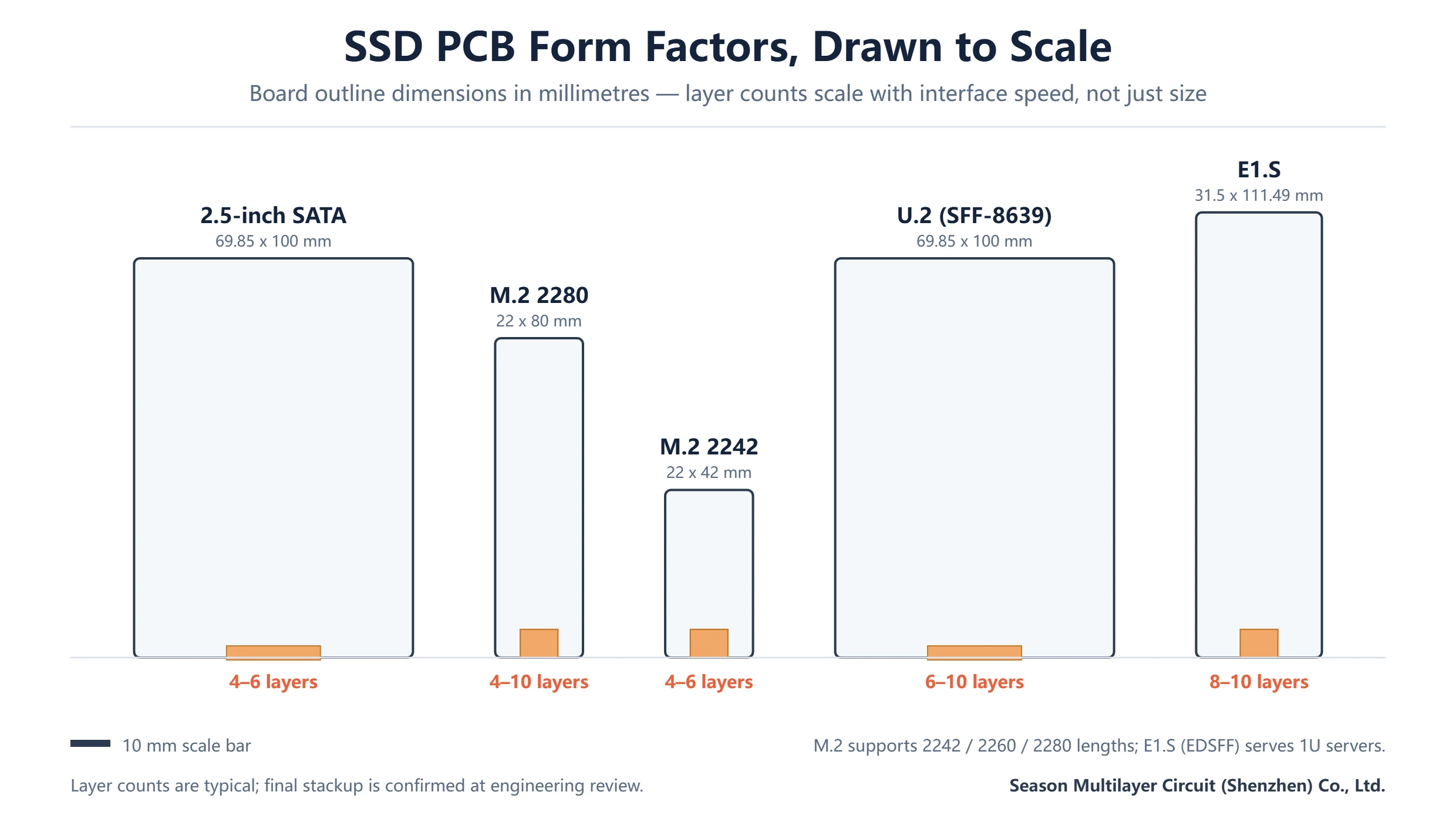
Our 4-layer SATA SSD PCB service covers the classic 2.5-inch class, while the 10-layer M.2 SSD PCB shows what a Gen4-class edge-connector build looks like in practice. If you are mapping a portfolio, it helps to read the form-factor table together with the stackup rules in our PCB stackup design guide.
Controller, NAND and DRAM: The Three Chips That Shape the Board
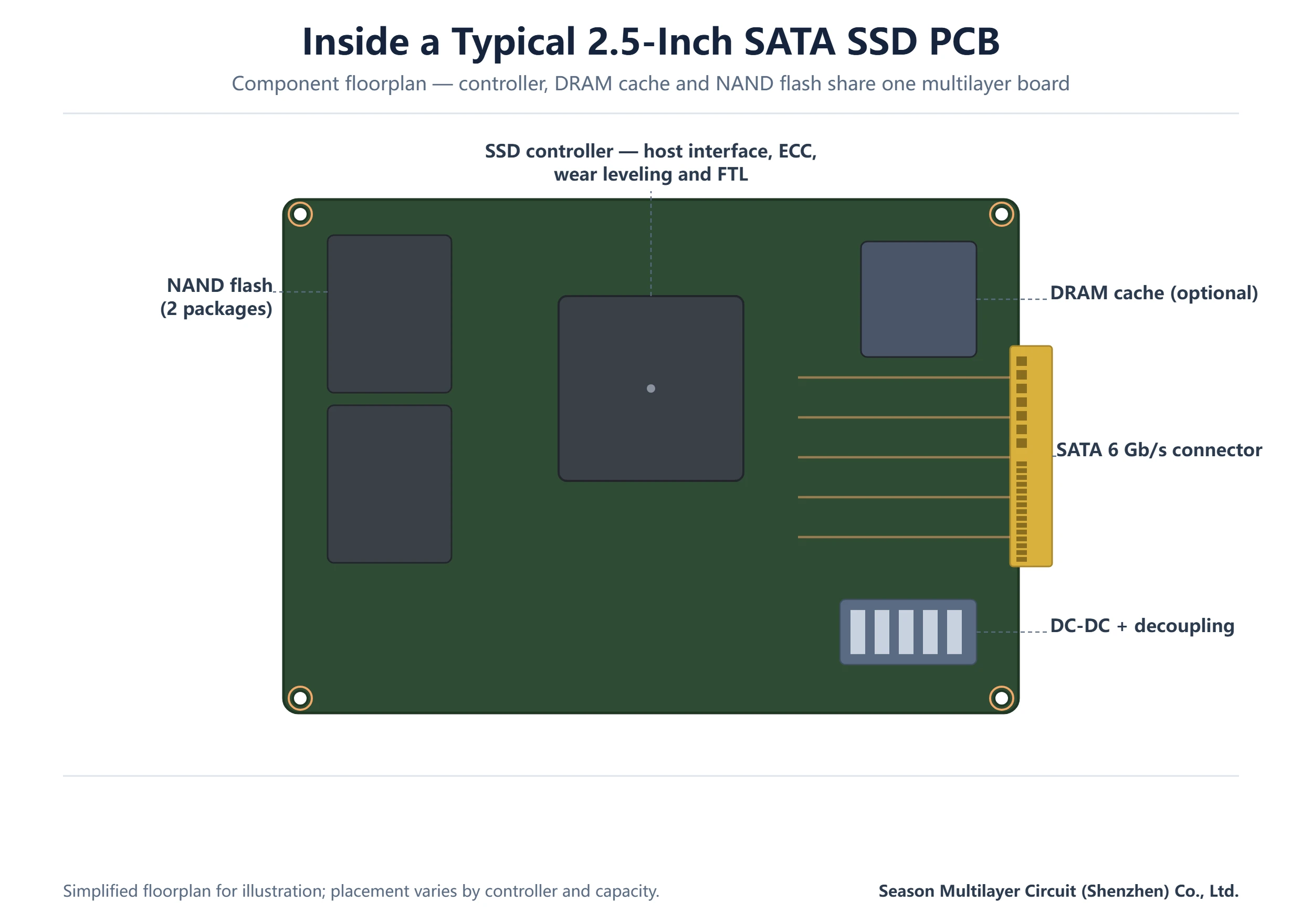
The controller is the largest and hottest device on an SSD PCB. It hosts the host-interface PHY, the error-correction engine and the flash-translation layer, so its placement anchors the whole floorplan. SATA or PCIe lanes must reach the connector with short, matched runs. The controller’s many NAND channels fan out from its perimeter to the flash packages in a controlled way.
NAND packages sit where their channel traces can stay short and length-tolerant. On a 2.5-inch board they typically occupy one side in a row, while on M.2 blades they may be stacked on both sides of the board to fit capacity into the 80 mm envelope. DRAM — where the design includes it — sits close to the controller on its own address bus. Designs that skip DRAM trade that chip for more controller-internal SRAM and heavier host memory buffering.
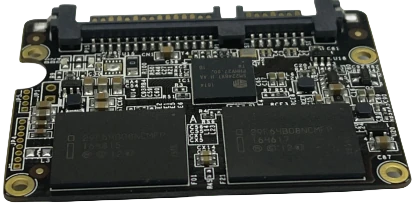
Around these three, a cloud of passives does the quiet work. Bulk capacitors near the connector hold the 5 V or 3.3 V rail steady during sudden write bursts. Decoupling capacitors sit at every supply pin, and a small power stage drops the host voltage down to the core rails. On a well-partitioned board you can read the functions directly off the copper: interface on one edge, flash channels in the middle, power on the far side. That partition is what a disciplined SSD controller board layout optimizes for. The SSD controller board layout places the PHY close to the gold-finger edge, keeps each NAND channel inside its own corridor, and reserves the far corner for the power stage. Its switching noise therefore never shares a return with the host pairs. Teams that inherit a reference design and convert it to a new form factor should re-walk this partition explicitly. An SSD PCB design that keeps the same parts but moves them across the board can silently break every corridor the reference relied on.
How Many Layers Does an SSD PCB Need?
Layer count follows the interface, not the capacity. A SATA 6 Gb/s drive routes few enough high-speed pairs that four layers — signals on the outside, solid planes in the middle — carry it comfortably. That is why budget drives and industrial modules still ship on 4-layer boards. PCIe multiplies the pair count: a ×4 NVMe drive has four transmit and four receive pairs plus reference clocks, and Gen4 speeds make insertion loss and via stubs visible on even short boards.
In practice, M.2 Gen3 designs commonly land on 4–6 layers, Gen4 client designs on 6–10, and enterprise U.2 or E1.S boards on 8–10 with dedicated ground layers between every signal layer. Adding layers is usually cheaper than re-spinning a board that fails compliance testing, so most engineering teams leave one plane pair of headroom in the first build. M.2 SSD PCB layers deserve a closer look because the 22 mm width caps how much can be routed on one signal layer. Moving from four to six and then to ten layers is not luxury. A Gen4 x4 drive needs the adjacent reference planes, and a 10-layer M.2 build separates each NAND channel group so its return currents never overlap the host lanes. When in doubt, size the M.2 SSD PCB layers from the interface first and the capacity second, then let the design grow one plane pair rather than one respin.
| Scenario | Typical layers | Why this works |
|---|---|---|
| 2.5-inch SATA client drive | 4 | Only two differential pairs per direction; planes carry power and return |
| M.2 2280, PCIe Gen3 ×4 | 4–6 | Eight high-speed pairs fit one signal layer; extra layer separates NAND channels |
| M.2 2280, PCIe Gen4 ×4 | 6–10 | Tighter loss budget needs adjacent reference planes and short stubs |
| U.2 / E1.S enterprise | 8–10 | Dense power network, more channels, thermal and stiffener requirements |
The trade-off mirrors the reasoning in our E1.S SSD PCB design guide and U.2 SSD PCB layout guide: enterprise shapes push layer counts up not because the board is bigger, but because the signal and power environment is stricter.
Signal Integrity: SATA and PCIe Differential Routing
The host-interface pairs are the first-class citizens of SSD PCB routing. SATA runs two differential pairs each way; PCIe Gen3 and Gen4 run them per lane with strict intra-pair skew and length-matching windows. The pairs need a continuous reference plane underneath, solid ground stitching around every layer transition, and avoidance of plane splits — a pair crossing a power-plane void becomes an antenna exactly where the receiver is most sensitive.
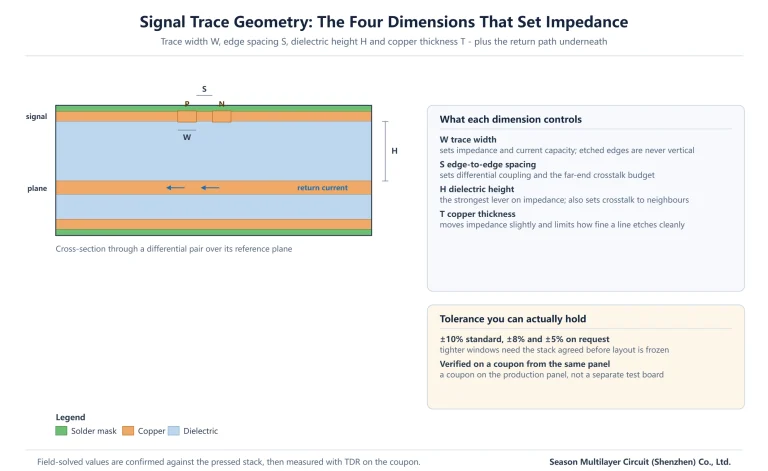
Impedance is specified, not assumed. Differential pairs are typically held at 90 Ω ±10% (±5% on the most demanding enterprise lanes), and the fabricator verifies the values on a test coupon from the same panel. NAND channels are slower and length-tolerance is wider, but their count is high — eight or sixteen traces fanning to each package. They get the layer space left over after the host pairs are placed, not the other way round.
Via discipline matters more on edge-connector forms. Every host-lane via is a reflection point; backing off drill size, keeping stubs short, and specifying the layer transition in the fab notes are all cheaper than compensating in firmware. The IPC standards for high-speed design published by the Global Electronics Association give workable starting numbers for spacing, skew and coupon construction, and most drive teams hold their layout to them. Two habits keep a storage board out of the signal-integrity queue. First, treat every SSD PCB design decision that shortens a host pair — connector position, controller rotation, via count — as worth an hour of floorplanning before routing starts. Second, keep the NAND fan-out honest: an SSD controller board layout that groups channels cleanly routes faster and produces fewer crosstalk surprises than one that lets flash escape drift under the controller. Both habits cost less than one compliance respin, which is why experienced SSD PCB design teams enforce them before the first trace is drawn.
Power Integrity and Thermal Paths on an SSD PCB
NAND writes are bursty by nature: the controller programmes a block, the current spikes, and the rail must recover before the next command. That is why bulk capacitance clusters near the power entry and a tighter decoupling lattice surrounds the controller and each NAND group. A four-layer SATA board gets away with wide power pours on the inner layers; enterprise boards often dedicate whole layers to the 3.3 V and core rails to keep the impedance of the distribution network low.
Thermal design shares the same copper. The controller pad is usually the hottest point, so thermal vias drop heat into inner planes and, on enterprise forms, into stiffeners or the chassis. Copper balance across the stack keeps the board flat so the thermal interface material actually contacts the controller. A warped M.2 blade loses its heatsink path and throttles first, before any component reaches a true limit. Thermal vias under the controller pad pull heat into the inner planes, but they only work if the stack gives them somewhere to go. That somewhere is a dedicated thick copper layer or a metal stiffener under the label area. Designers who plan the thermal path at floorplan stage place the controller where a heatsink screw can reach it; those who decide after routing discover that the best thermal location is occupied by a NAND channel. This is one more reason an SSD PCB design is sequenced from the enclosure inward, not from the schematic outward.
Manufacturing Requirements for SSD PCB Builds
Most SSD PCB work sits in a sweet spot the industry understands well: fine but not extreme lines, controlled impedance, gold fingers and ENIG. What separates a clean build from a problem build is how completely the fab notes capture the special items. Edge-connector bevel, impedance coupons and solder-mask openings on the gold fingers all belong in the release package. So do the V-cut or scoring dimensions that let the drives depanel without stressing the connector area.
| Parameter | Typical capability | Why it matters on storage boards |
|---|---|---|
| Minimum line / space | 2/2 mil (1.8/1.8 mil on review) | NAND channel fan-out and PCIe escape routing |
| Impedance tolerance | ±10% (±8% / ±5% on request) | Host-interface pairs must meet the PHY spec |
| Surface finish | ENIG (HASL / OSP on cost builds) | Gold fingers and fine-pitch BGA wetting |
| Edge connector | Hard gold fingers, bevelled | M.2 / U.2 insertion durability |
| Layer range | 4–30 layers, 2–30 layer factory | From SATA modules to enterprise blades |
| Copper weight | 1–3 oz typical | Power rails and thermal spreading |
Before release, most teams do a quick Gerber data sanity pass — layer order, impedance-controlled net labels, coupon placement — because the cheapest moment to catch a missing plane is before lamination, not after a compliance failure. Factories that build storage boards routinely will flag a missing stiffener or an undersized return path at engineering review, which is exactly the feedback a first build needs. The same discipline applies to test artifacts: an impedance coupon per panel, a flying-probe netlist for prototypes, and X-ray sampling on the controller BGA all belong in the release package. A quote that prices an SSD PCB design without these items is cheaper on paper and more expensive after the first compliance failure. Coupon data is what turns an M.2 SSD PCB layers debate into a measured yes-or-no answer.
An SSD PCB Design Review Checklist
Before an SSD PCB goes to fabrication, a ten-minute pass over the items below catches most of the issues we see at engineering review. None of them is exotic; they are simply the details that get forgotten when a layout is rushed out of a reference design.
- Host-interface pairs: length-matched, referenced to an unbroken plane, impedance target stated in the fab notes
- Layer transitions on high-speed pairs: ground via adjacent to every signal via
- NAND channel fan-out: grouped per controller channel, escape routing planned before placement freezes
- Bulk and decoupling capacitance: sized for write bursts, not just average current
- Gold fingers: hard-gold spec, bevel note, solder-mask openings defined
- Stackup symmetry and copper balance: verified against warpage targets for the enclosure
- Depaneling method: V-cut or routing tab placed away from the connector edge
If the design reuses a qualified controller reference layout, diff the board against the reference rather than trusting the reuse — form-factor conversions are where reference-plane breaks and skew violations hide. For a second opinion on the stackup itself, the layer-count table above pairs well with our dedicated form-factor guides. For teams planning a new variant, the checklist doubles as a scope sheet: the first three items define the high-speed work, the next four the power and mechanical work, and the last one the assembly risk. Sharing it with the fabricator before placement freezes lets the SSD PCB design absorb feedback while changes are still cheap. It also lets the M.2 SSD PCB layers decision be confirmed by the coupon plan rather than by a respin.
Frequently Asked Questions
What does an SSD PCB actually do?
It physically carries and electrically connects the controller, NAND flash, optional DRAM and power components inside a solid-state drive, and it routes the SATA or PCIe differential pairs to the host connector. Its layout quality directly affects whether the drive sustains its rated speed or throttles under load.
How many layers does an M.2 SSD PCB need?
PCIe Gen3 M.2 designs commonly use 4–6 layers; Gen4 designs usually move to 6–10 so every high-speed pair has an adjacent reference plane and short via stubs. SATA-based M.2 modules can stay on 4 layers. The right answer depends on lane count, speed grade and compliance budget, confirmed at engineering review.
Which surface finish is used on SSD PCB gold fingers?
Edge-connector fingers get hard gold plating over nickel with a bevel for insertion, while the rest of the board is typically ENIG for fine-pitch BGA assembly. Cost-driven client drives sometimes switch body areas to OSP or HASL, keeping gold only on the fingers and critical pads.
Why do Gen4 SSD PCBs need tighter impedance control than SATA boards?
PCIe Gen4 doubles the signaling rate, which shrinks the loss and reflection budget. Small impedance discontinuities that a SATA receiver ignores become visible eye-closure at Gen4 speeds, so differential impedance is held to ±10% at minimum and often ±5% on the host lanes, verified by coupon.
Can one SSD PCB design cover multiple drive capacities?
Usually yes within a form factor: controllers and layout often support more NAND package positions than a given capacity populates, so 1 TB and 2 TB variants may share one board with different assembly. Capacity jumps that change interface speed or power class generally need a new layer count and power review.
What does a manufacturer need to quote an SSD PCB?
Gerber and drill files, the stackup with impedance targets, board thickness and finish, gold-finger specification, and any stiffener or thermal requirements. With those, a factory can confirm layer count, impedance feasibility and lead time in one engineering review instead of a quote-then-requote cycle.
How long does an SSD PCB prototype take to build?
A standard 4–6 layer SATA or Gen3 M.2 build typically runs one to two weeks after engineering review; 8–10 layer enterprise builds with impedance coupons run longer. Exact dates are confirmed at engineering review, since coupons and gold-finger processing add steps that depend on the panel schedule.
Get Your SSD PCB Stackup Reviewed Before You Release Gerbers
Season Multilayer Circuit (Shenzhen) Co., Ltd. builds storage boards from 4-layer SATA modules to 10-layer M.2 and enterprise blades, with impedance control, hard-gold fingers and ENIG as standard production items. The factory is part of a group with three plants and an annual capacity of 3,000,000 m². Send your Gerber files and stackup targets for an engineering review, and our team will confirm layer count, impedance feasibility and lead time before you commit to a build.