Book Appointment Now

Positive film vs negative film explained for buyers: which route your board takes, how copper thickness and fine lines are affected, and what to confirm.
Positive Film vs Negative Film PCB: Pattern Plating and Print-and-Etch
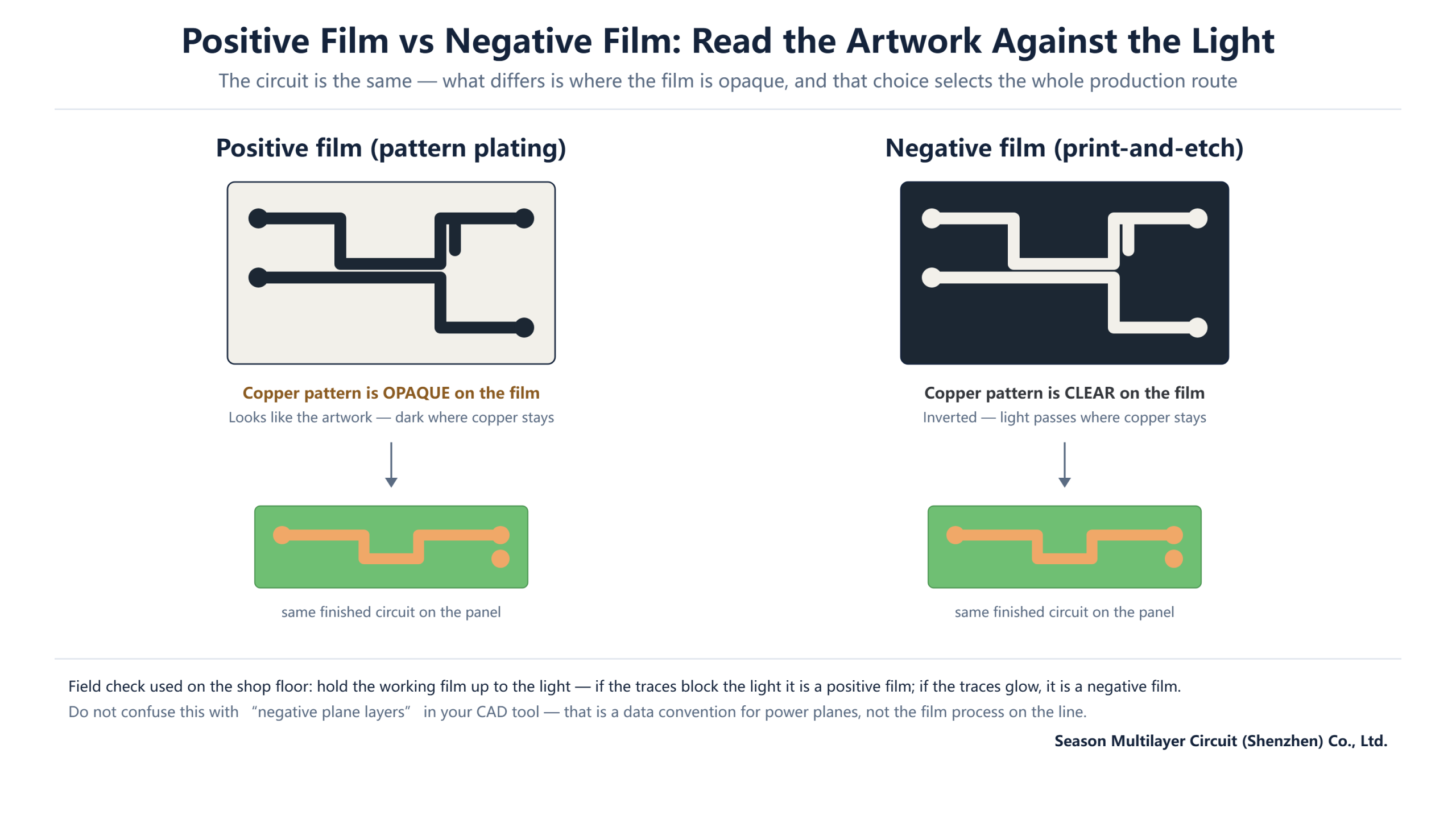
Most buyers never see the moment that shapes their board’s outer layers: the working film that carries the circuit pattern into the dry film resist. Whether that film is opaque or clear over the traces — positive film vs negative film — silently selects the entire production route that follows, from etch chemistry to how thick the copper in your holes and traces ends up.
This guide decodes the two routes the way an engineer would use them: what each film polarity looks like, which process chain it triggers, how final copper thickness and line resolution are affected, and the handful of things worth confirming before you release Gerber files for fabrication.
Table of Contents
- What Film Polarity Means on the Production Line
- Positive Film: The Pattern Plating Route
- Negative Film: The Print-and-Etch Route
- Positive Film vs Negative Film: Side-by-Side
- Copper Thickness and Impedance Consequences
- Fine-Line Capability and Etch Limits
- Positive Film vs Negative Film: Which Route Fits Your Build
- Gerber Polarity and DFM Notes
- Common Misconceptions Worth Unlearning
- FAQ
- Get Your Layer Polarity Confirmed Before Release
What Film Polarity Means on the Production Line
Image transfer starts with a phototool — the film carrying your circuit pattern — and a dry film resist that hardens where ultraviolet light reaches it. Because standard dry film is negative-working, the polarity of the film decides everything downstream: where resist survives development, where copper is protected or exposed, and whether the board is then plated in pattern or etched directly.
The field check is simple enough to do on the shop floor. Hold the working film up to the light: if the traces block the light, the film carries the circuit as an opaque image — a positive film. If the traces glow and the background is dark, the circuit is defined by clear openings — a negative film. Same circuit, opposite artwork polarity, and two entirely different production routes behind each choice.
One clarification saves a lot of confusion: this has nothing to do with “negative plane layers” in your CAD tool. Plane layer polarity is a data convention that describes how copper pours are drawn in the Gerber files; film polarity is a manufacturing decision about how those files become copper on the panel. We untangle the Gerber side in the DFM section below.
It also helps to see where imaging sits in the wider flow. Drilling and copper deposition come first, so by the time a panel reaches the exposure unit it already has plated holes; imaging then decides how the surface copper is shaped into circuits, and lamination joins the layers afterwards for a multilayer build. That ordering explains why the route choice lives with the fabricator: it is an optimisation across their own equipment, their chemistry inventory and their panel schedule — with your design requirements as the fixed constraint around it.
Positive Film: The Pattern Plating Route
A positive film is opaque over the traces, so after exposure and development the resist is stripped away exactly where the copper should grow. The panel then enters pattern plating: electroplated copper is built up inside the developed channels, and a layer of tin — the etch resist — goes on top of the freshly plated pattern.
From there the sequence runs down the SES line: strip the dry film, alkaline etch removes the base copper everywhere the tin is not protecting it, then the tin is stripped to reveal the finished traces. The defining property of this route is that copper is added in the pattern — the final trace and hole copper equals the base foil plus everything the pattern plating deposits.
That additive step is what makes pattern plating the precision route. Plating grows copper between the resist walls, so line geometry is defined by lithography rather than by etch undercut, which is why demanding fine-line work and controlled-impedance designs are normally routed through it. The price is a longer chain — two extra plating operations and an extra strip — with the equipment and process control that implies.
Negative Film: The Print-and-Etch Route
A negative film is the mirror image: the traces are clear, the background is dark. Light hardens the resist over the traces, development washes away the unexposed resist elsewhere, and the exposed copper between the traces goes straight to the etch line. Acid etch removes it, the resist is stripped, and the board is done — the shortest image-transfer chain in the plant.
This is the print-and-etch route, run on the DES line. Copper is only ever removed; the final trace copper is simply the base foil plus whatever panel plating was applied before imaging. That makes thickness extremely predictable and the route economical, which is why simple multilayers and high-volume boards default to it.
The limitation is geometric. Etching attacks copper sideways as well as downwards, so traces emerge with a slight trapezoid cross-section and the effective line width carries an undercut allowance. For generous lines and spaces this is a rounding error; for the finest structures it is the ceiling that pushes those designs to the pattern plating route instead.
Positive Film vs Negative Film: Side-by-Side
The table below condenses the two routes into the properties that matter when you are reading a quotation or preparing DFM data. Neither route is better in the abstract — they are optimised for different jobs.
| Aspect | Positive film → pattern plating | Negative film → print-and-etch |
|---|---|---|
| Film appearance | Traces opaque, background clear | Traces clear, background dark |
| Resist protects | Everything except the pattern | The pattern itself |
| Post-develop operations | Pattern plate Cu + tin, strip, etch, strip tin | Acid etch, strip |
| Etch chemistry | Alkaline (SES line) | Acidic (DES line) |
| Final trace copper | Base foil + plated copper | Base foil + panel plate only |
| Line definition | Set by lithography and plating | Set by etch, with undercut allowance |
| Typical fit | Fine lines, impedance control, thick trace copper | Simple multilayers, volume builds |
A detail worth noticing: both routes start from the same drilled and copper-deposited panel. The routes diverge only after development, which is why switching a design between them is a fabrication decision, not a redesign — but it does change what you should expect from the finished copper.
Copper Thickness and Impedance Consequences
Here is where film polarity quietly reaches into electrical performance. On the pattern plating route, finished trace copper is the base foil plus the plated build, so a nominal one-ounce design can land measurably heavier unless the fabricator plans the stackup around the added copper. Reputable manufacturers state final copper targets explicitly and tune plating time to them.
For controlled-impedance boards this matters twice over. Trace thickness sits inside the impedance equation alongside trace width and dielectric height, so the route choice feeds directly into what the fabricator must hold. On the print-and-etch route the copper starts fixed; on the pattern plating route it is engineered to target. Either can hit the impedance window — the difference is where the control effort goes, and it is one more reason impedance targets belong in the stackup discussion early.
Hole copper tells a similar story. Pattern plating concentrates current into the holes and traces during the second plating step, which is one of the reasons it remains the default where substantial barrel copper is required — a consideration that comes up on thicker builds such as 14-layer computing boards.
The practical takeaway for design teams is to stop treating copper weight as a single number and start treating it as a target with a route attached. If your stackup says one ounce outer layers but the design also demands fine lines, the fabricator will likely run pattern plating and the finished copper will be the sum of foil and plate — engineered to hit one ounce, not to drift near it. Asking how final thickness is held, rather than just what it is, is the question that separates a controlled build from a lucky one.
Fine-Line Capability and Etch Limits
Etch undercut is the practical boundary between the routes. Acid etching on the print-and-etch line removes copper sideways under the resist edge, so the delivered line is narrower than the resist opening by a small amount on each side. Fine-line designs compensate for this in the artwork, but every compensation eats into the spacing budget between neighbouring traces.
Pattern plating sidesteps most of that: the resist defines the channel, copper grows inside it, and the final line width is governed by lithography and plating rather than by how deep the etch bit. That is why the finest line and space work — dense BGA breakout regions, impedance-critical differential pairs — concentrates on the positive film route, with modern plants holding lines in the low-mil range as routine work.
For a sense of scale, our production standard for 8-layer intelligent terminal boards and comparable builds is a 2/2 mil minimum line and space, with tighter geometries handled by engineering review. The route those geometries take through the plant is decided by exactly the film logic this article describes — not by chance and not by the sales team.
Positive Film vs Negative Film: Which Route Fits Your Build
You rarely choose the route by name — you choose it by designing a board that only one route can hold. This judgement table maps the common situations to the route that usually fits, and the reasoning a fabricator will apply.
| Your situation | Route that usually fits | Why |
|---|---|---|
| Simple 2–6 layer board, generous lines | Negative film, print-and-etch | Shortest chain, predictable copper, lowest cost |
| Volume consumer or appliance build | Negative film | Economics compound at panel scale |
| Fine-pitch BGA breakout, tight spacing | Positive film, pattern plating | Lithography-defined lines beat etch undercut |
| Controlled impedance with tight windows | Positive film | Trace thickness engineered to target |
| Heavy trace copper for power delivery | Positive film | Copper is added in the pattern |
| Mixed design: fine lines plus power layers | Both, layer by layer | Inner and outer layers route independently |
That last row is the one buyers miss most often. A single multilayer board routinely mixes routes across its layer set — inner signal layers imaged one way, plane-heavy layers another, outer layers according to their own density. A straightforward 4-layer router board may live entirely on the print-and-etch route, while a dense computing stack exercises both. The plant optimises per layer, not per board.
Gerber Polarity and DFM Notes
The design-side counterpart of film polarity is Gerber polarity: how each layer file declares which regions are copper. The Gerber format specification defines image polarity explicitly, and modern CAD exports handle it correctly — but the classic failure mode survives anyway: a layer exported with the wrong polarity convention arrives at the plant looking like its own negative, and the panel comes back inverted.
The defence costs one line in the fabrication notes. State the polarity convention of your export, flag any intentionally inverted layers, and let the fabricator’s CAM review confirm agreement before tooling. The IPC standards family that governs data transfer and acceptance assumes this handshake happened; when it did not, polarity disputes are among the most expensive misunderstandings in board procurement because they are only discovered at first article.
DFM review is where this gets caught in practice. Our guides to inner layer dry film and etching and outer layer fabrication show the imaging steps in detail, including where polarity is checked. If your supplier’s DFM report does not mention imaging route or polarity at all, that is worth a question.
A useful DFM report names three things per layer: the imaging route each layer will take, the compensation applied for etch or plating, and the expected finished copper. With those three facts in hand you can sanity-check the impedance math and the copper weights yourself before the panel is tooled. Reports at that level of detail also make supplier comparisons honest — two quotes for the same design can differ precisely because one plans the pattern plating route and the other expects the design to be widened to survive etch.
Common Misconceptions Worth Unlearning
A few misconceptions keep circulating in design teams, and each one costs something specific to unlearn:
- “Negative film means my plane layers are wrong.” No — negative plane layers in CAD are a data convention; the film process is chosen by the fabricator per layer and has nothing to do with your plane settings.
- “One route is always cheaper.” Print-and-etch wins on simple work, but forcing a fine-line design through it means widening lines to survive undercut — which can cost more board area than pattern plating would have cost.
- “The route changes my design files.” It does not. The same Gerber set runs down either line; the fabricator generates its own phototools with the correct polarity.
- “Finer lines always need pattern plating.” Mostly true at the leading edge, but a capable etch line with good compensation covers a wide range — check the actual capability before paying for the longer route.
The unifying principle: film polarity is a manufacturing decision with design consequences, not a design decision with manufacturing consequences. Treat it as one of the parameters the engineering review confirms, alongside stackup and impedance targets, and it stops being a source of surprises.
Frequently Asked Questions
What is the difference between positive and negative film in PCB manufacturing?
Positive film carries the circuit as an opaque image, triggering the pattern plating route where copper is added in the traces. Negative film carries the circuit as clear openings, triggering print-and-etch where copper outside the traces is removed. Same circuit data, opposite artwork polarity, and two different production chains.
Can one PCB use both processes on different layers?
Yes, and most complex boards do. Each layer is imaged and etched independently, so a dense inner signal layer can run the pattern plating route while simpler layers use print-and-etch. The fabricator assigns routes per layer based on line density, copper weight and impedance targets.
Does negative film mean negative plane layers in my CAD tool?
No. Negative plane layers are a Gerber data convention describing how copper pours are drawn in the design files. Film polarity is a manufacturing decision about how phototools are made from those files. The two concepts are unrelated even though the word is the same.
Which process gives better fine-line control?
Pattern plating on the positive film route. Lines are defined by lithography and copper grows between the resist walls, so there is no etch undercut to compensate. Print-and-etch delivers a slight trapezoid cross-section from sideways etching, which becomes the limiting factor on the finest geometries.
Why does pattern plating change final copper thickness?
Because copper is added, not just removed. The finished trace is the base foil plus everything plated in the pattern step. Fabricators account for this when planning the stackup, and it is one reason impedance targets must be agreed with the manufacturer rather than assumed from nominal foil weights.
How do I tell the fabricator which polarity my Gerber files use?
State the export convention in your fabrication notes and let CAM review confirm it against the files. Modern CAD exports carry correct polarity metadata, so a simple declaration plus a competent DFM review is enough. Polarity mismatches caught at tooling cost minutes; caught at first article, they cost a scrapped build.
Which route is cheaper for volume production?
Print-and-etch, when the design allows it. It has the shortest chain — expose, develop, etch, strip — and the copper thickness comes from the base foil rather than added plating time. The economics reverse when a design needs fine lines or heavy trace copper, where pattern plating avoids rework and yield loss.
Get Your Layer Polarity Confirmed Before Release
Send your Gerber set and stackup intent, and the engineering team will confirm imaging routes per layer, final copper targets and impedance windows before tooling — the review that catches polarity and route mismatches while they are still free to fix. Start with our PCB manufacturing services to submit files for review.